Use Nano Banana 2.1 to explore image drafts, then compare Pro on the same brief. Keep Pro in your shortlist and compare both on the work you actually need: the correct headline, recognizable product, required layout and usable final file. A lower price alone does not tell you which result will work better.
Try Nano Banana 2.1 on FreyaVideo or open Nano Banana Pro.
Updated October 8, 2026. This is a documentation and pricing comparison, not a controlled quality or latency benchmark. Provider prices can change.
What is different about Nano Banana 2.1?
Google describes Nano Banana 2.1 as an upgrade to Nano Banana 2 and the efficient counterpart to Nano Banana Pro. Its documentation highlights improvements to text and layout, wide images, reference-image handling and grounding. These are model capabilities; individual apps may expose only a subset. Google model documentation.
The name matters: Nano Banana 2.1 and Nano Banana Pro are separate models. Selecting Pro does not automatically switch your request to 2.1.
Nano Banana 2.1 vs Pro at a glance
| Question | Nano Banana 2.1 | Nano Banana Pro |
|---|---|---|
| Google positioning | Efficient counterpart to Pro; upgrade to Nano Banana 2 | Pro member of the image model family |
| Image workflows | Generation and editing | Generation and editing |
| Fal output resolution | 1K, 2K, 4K | 1K, 2K, 4K |
| Provider cost | Token-based; depends on output, prompt and reference inputs | Check the provider and route you use |
| Practical selection | Explore drafts and test your brief | Compare the same brief for another result |
Understand the provider cost
Fal currently documents token-based billing, rather than a guaranteed fixed price per image. Its October 7, 2026 measurements for one 16:9 image with a short prompt and default medium thinking were:
| Resolution | Text-to-image example | Editing example, one reference |
|---|---|---|
| 1K | $0.0396 | $0.0415 |
| 2K | $0.0593 | $0.0613 |
| 4K | $0.1335 | $0.1354 |
These are Fal's measured examples, not a price cap or FreyaVideo's retail charges. Longer prompts and additional reference images add input tokens. Compare the actual route and usage when budgeting; do not infer a fixed Pro-versus-2.1 cost ratio from these samples. Fal pricing and measurement conditions.
Which model should you choose?
For product ads, create a short brief with a fixed product position, background and headline. Try a few layouts with 2.1, then compare your best brief with Pro. Count how many results you would actually publish, rather than which thumbnail looks more striking.
For posters and text-heavy graphics, verify every word, line break and date at full size. A convincing composition can still contain a wrong character. Keep the text brief and make its hierarchy explicit: headline, supporting line and call to action.
For reference-based edits, check the details you wanted to preserve: label, shape, color and framing. Compare both models with the same references and instructions. Do not assume one successful edit proves consistent performance across products.
For large final images, settle the composition before choosing a more expensive resolution. Higher pixel dimensions cannot rescue a wrong headline or misplaced subject.
What FreyaVideo supports today
The Nano Banana 2.1 generator offers:
- Text-to-image and editing with up to 14 reference images.
- 1K, 2K and 4K output.
- Square, portrait, landscape and extra-wide aspect ratios.
- PNG, JPEG and WebP downloads.
FreyaVideo uses Fal for this integration. Google's grounding features and Fal's optional web-search or thinking controls are not exposed in this workflow. See the provider contracts for generation and editing.
Each image on FreyaVideo costs 16 credits at 1K, 24 at 2K or 32 at 4K. The generator shows the request total before submission. Compare the Pro cost displayed in its generator; Freya's Pro route uses a different provider from the Fal samples above.
A brief you can use to compare both
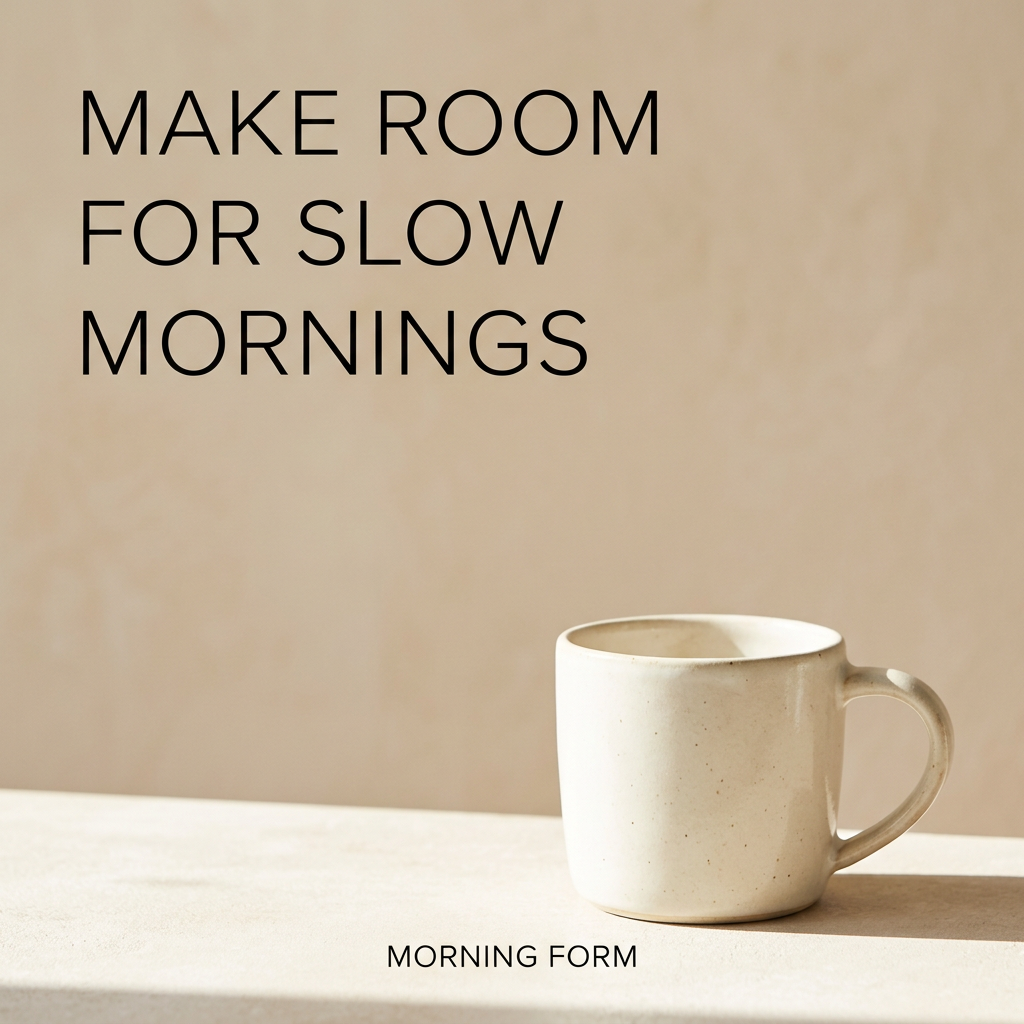
Create a square product advertisement for a fictional ceramic mug brand called MORNING FORM. Place one cream-colored mug in the lower right on a warm beige background. Use soft daylight from the left. In the upper left, include only the headline “MAKE ROOM FOR SLOW MORNINGS” on three readable lines. Leave generous empty space. No extra words or logos.
For an edit, upload your own product image and add:
Preserve the mug's silhouette, handle and glaze color from the reference. Change only the background and surrounding layout. Do not add a new product label.
Use the same resolution and prompt for both models. Record text accuracy, product fidelity, layout and credits spent. This small checklist gives you a practical answer for your own campaign without relying on a general ranking.
Create your first Nano Banana 2.1 draft.
Integration examples
These images came from our Nano Banana 2.1 text-generation and reference-editing checks, not a Pro comparison test. The first output added brand text beyond the requested headline; the edit removed the text and changed the backdrop to blue. Review generated content before publishing.

Frequently asked questions
Is Nano Banana 2.1 the same as Nano Banana Pro?
No. Google positions Nano Banana 2.1 as the efficient counterpart to Pro. They are separate models in the same image generation family.
Can I use Nano Banana 2.1 on FreyaVideo?
Yes. The generator supports text-to-image, reference-image editing, 1K/2K/4K output and PNG/JPEG/WebP.
How much does Nano Banana 2.1 cost on FreyaVideo?
Each image costs 16 credits at 1K, 24 at 2K or 32 at 4K. Check the total before submitting.