AI Video Generator

Seedance2.5 AI Video Generator

Seedance2.5 is a multimodal director for generation, editing, and extension

Workflow

Prompt only

Output Format
Generate Audio
Execution Expires After
Priority0
Use web search context
Watermark
Return Last Frame

We do not support adult, explicit, privacy-invasive, or unsafe video generation. Blocked requests do not use credits.

FREYAVIDEO-VERIFIED OUTPUTS

Six Seedance2.5 workflows, tested with real outputs

Every case below comes from a paid FreyaVideo generation and keeps the submitted prompt, input role, output settings, task record, and measured result together. Stored masters are never replaced with simulated workflow previews.

Generated with Seedance2.5 on FreyaVideo. These are not provider showcase assets.

Browse tested Seedance 2.5 prompts

Select a verified workflow

PAID TEST VERIFIED
TEXT TO VIDEO

Vertical glass koi

A prompt-only vertical macro shot made for social placement, with a single glass koi, continuous camera rise, and generated ambience.

Test input

Prompt only, with no image, video, or audio reference.

Measured output

Output
480 × 854 · 480p
Aspect ratio
9:16
Actual duration
5.056s
Container
MP4
Audio
Native audio
Last-frame return
Enabled

What the result proves

The 9:16 result kept one stable translucent koi throughout a continuous shot and returned a real, non-empty native audio track.

Tested:
Aug 12, 2026
Test record:
R2
View the exact prompt and test record
Exact submitted prompt
A single continuous vertical macro shot of a translucent glass koi swimming upward through a dark museum atrium filled with suspended golden dust. The camera rises smoothly beside the koi as its fins refract cyan and amber light and tiny droplets orbit like crystal beads. End with the koi turning toward a circular skylight as soft ripples of light spread across the walls. Photorealistic glass caustics, stable anatomy, smooth motion, delicate water and glass ambience. No people, text, logos, cuts, camera shake, extra fish, warping, or morphing.
Open this workflow
WHY SEEDANCE2.5

A director's model, not a single-shot preset

Generate

Move from text or a starting image to a complete shot with native audio and explicit output controls.

Frame

Use first and last frames to define the visual arc before the model fills in movement between them.

Reference

Separate identity, style, motion, and sound evidence across image, video, and audio assets.

Revise

Edit or extend an existing video when the useful source shot should be preserved instead of discarded.

MULTIMODAL TIMELINE

Direct every asset on one timeline

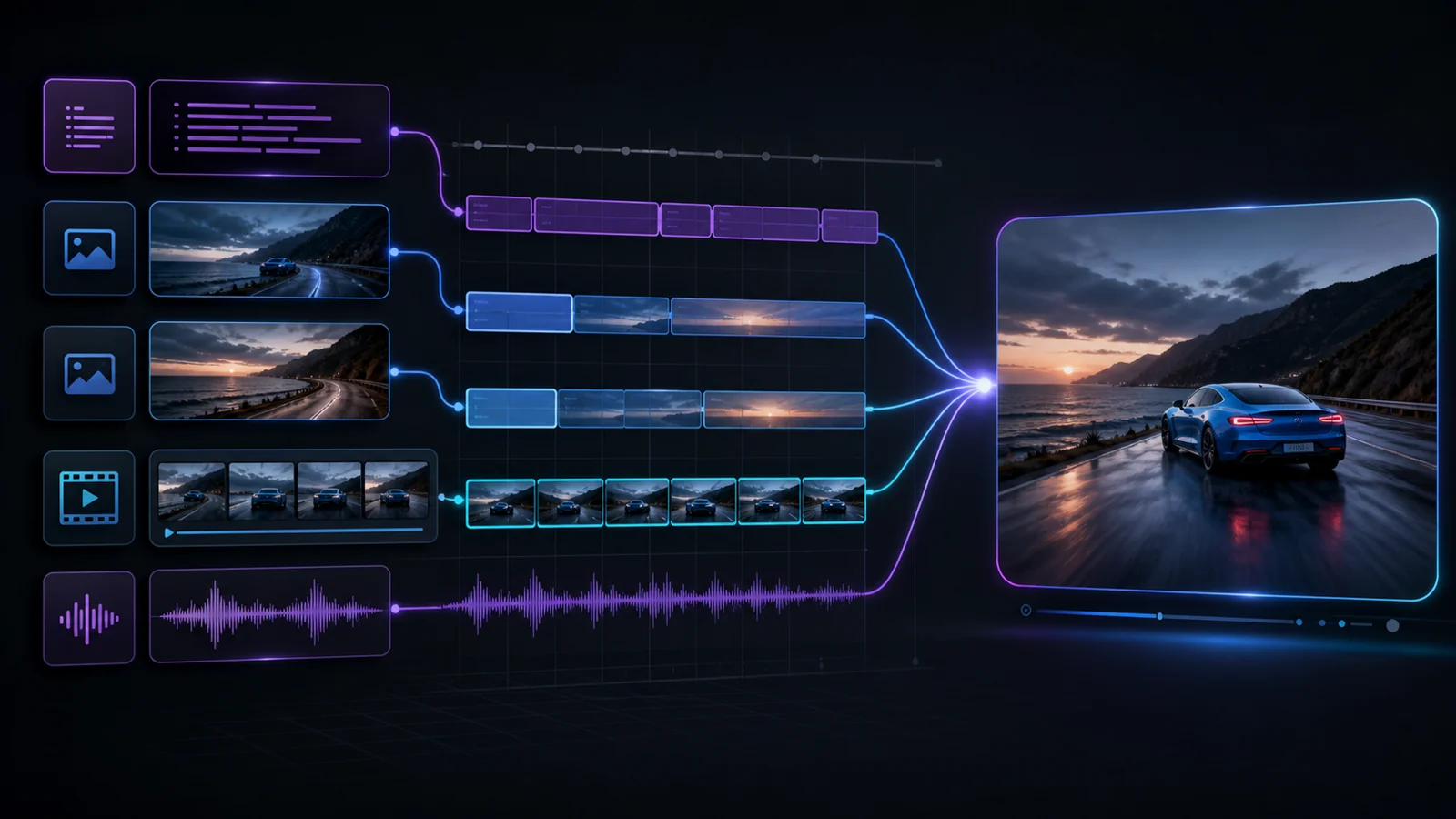
Seedance2.5 treats first and last frames, reference images, video clips, and audio clips as distinct inputs. Clear roles make the final motion easier to review and revise. The timeline below explains those input roles; it is not a generated result.

Workflow diagram of Seedance 2.5 input roles with first frame, last frame, image, video, and audio reference tracks
OFFICIAL LIMITS

A wider production envelope

The Seedance2.5 task contract supports generation and revision workflows with explicit media roles, long reference lists, native audio, and output controls designed for chained video production.

OPEN REFERENCE WORKFLOW
Output480P / 720P
Duration4–30S / AUTO
Reference ImagesUP TO 30
Reference Video / Audio10 + 10
// WORKFLOW MODES

Four ways to shape the shot

Use the smallest workflow that gives the production enough control, then move into references or editing only when the brief requires it. These panels explain each input mode; the verified generated results appear above.

Diagram of the Seedance 2.5 first-frame-to-video workflowFIRST FRAME
Diagram of the Seedance 2.5 first-last-frame video workflowFIRST + LAST
Diagram of Seedance 2.5 image, video, and audio reference rolesMULTIMODAL
Diagram of the Seedance 2.5 video editing and extension workflowsEDIT + EXTEND
MODEL STATUS
JUN 2026Seedance2.5 Model Version

FreyaVideo maps the stable product alias to the official June 2026 model version.

LIVEGeneration Modes

Text, first-frame, and first-last-frame generation are available through this workflow.

LIVEMultimodal References

Image, video, and audio references can be assigned explicit roles in supported tasks.

LIVEEdit and Extend

Existing videos can be revised or continued through dedicated task modes.

Common Questions

What is Seedance2.5?

Seedance2.5 is ByteDance's multimodal video model for text-to-video, frame-guided video, reference-guided generation, video editing, and video extension.

Which workflows are available?

The official model supports text-to-video, first-frame-to-video, first-last-frame-to-video, multimodal reference-to-video, video editing, and video extension.

How many reference files can I use?

A task can use up to 30 reference images, 10 reference videos, and 10 reference audio clips, with no more than 50 total reference assets. Video references and audio references each have a 30-second combined-duration limit.

What duration and resolution does Seedance2.5 support?

It supports 4–30 second output or automatic duration at 480p or 720p.

Can the model generate audio?

Yes. Native audio generation can be enabled, and reference audio can also guide supported multimodal workflows.

Can the model use a first and last frame?

Yes. Supply a first frame and a last frame to define the opening and closing compositions while the model generates the motion between them.

Can I edit or extend an existing video?

Yes. Video edit changes a supplied clip from natural-language direction, while video extend continues a supplied clip beyond its current ending.

Does it replace Seedance 2.0?

No. FreyaVideo keeps Seedance2.5, Seedance 2.0, and Seedance 2.0 Fast as separate model choices so existing workflows and tasks continue to resolve correctly.

DEEP DIVE

Understanding Seedance 2.5

Seedance2.5 expands the model page from a prompt box into a multimodal director's desk. The key change is not simply a newer model name: it is the ability to choose the right task contract for generation, reference direction, revision, or continuation.

Core Capabilities

A simple shot can begin with text. A product reveal can use a first and last frame. A campaign shot can combine product images, a motion reference, and an audio cue. An existing clip can be edited or extended without discarding the useful source material.

Technical Foundation

Each input carries an explicit role such as first_frame, last_frame, reference_image, reference_video, or reference_audio. FreyaVideo validates those roles and task limits before compiling the request for the official Seedance endpoint.

Quality Assurance

Output controls cover 480p and 720p, 4–30 seconds or automatic duration, six fixed aspect ratios plus adaptive framing, native audio, watermarking, and optional final-frame return.

PROCESS

How It Works

1

Pick the Task Contract

Choose generation, frame guidance, multimodal reference, edit, or extend before adding assets.

2

Build the Asset Timeline

Assign each image, video, and audio file a clear role and stay within the count and duration limits.

3

Set the Delivery Frame

Choose duration, resolution, aspect ratio, audio, watermark, and last-frame return for the final placement.

4

Review a Stored Result

FreyaVideo waits for the asynchronous task, stores the completed output, and makes it available for download or the next workflow.

TIPS & TRICKS

Getting the Most from Seedance 2.5

Treat the task like a production handoff: name what each source controls, describe the smallest useful change, and state what must remain stable.

Choose the Smallest Sufficient Mode

Use text or a first frame for straightforward shots. Add a last frame, references, or a source video only when the brief needs that control.

Give Every Reference a Job

State which asset supplies identity, composition, motion, sound, the opening frame, or the closing frame.

Lock What Must Survive

For edits, name the subject, camera path, product geometry, text, or timing that must remain unchanged.

Extend Only the Next Beat

Describe the immediate continuation of action and camera movement rather than retelling the source video.

Design for the Destination

Pick a fixed aspect ratio for known placements and leave safe space around subjects that may need alternate crops.

Direct your next shot with Seedance2.5

START CREATING