MiniMax H3

MiniMax H3 AI Video Generator

Build the shot you have in mind. Start from text or an image, describe the motion and sound, and choose the output format for your next edit.

Generation is currently unavailable. You can still review the controls and verified examples without spending credits.

Seed

Choose how much time AI spends improving your prompt

We do not support adult, explicit, privacy-invasive, or unsafe video generation. Blocked requests do not use credits.

Create videos from text or images

MiniMax H3 works from a written scene or an existing image. For a first draft, describe who or what is in view, what moves, how the camera follows, and what can be heard. FreyaVideo keeps those decisions together, with output size and duration visible before you generate.

Frame a scene with words or an image

Use text-to-video to explore a new composition. Switch to image-to-video when the opening frame already exists, then describe what should move while keeping the subject recognizable. The first image determines the image-to-video framing.

Judge text and image workflows at the same size

All four verified examples below were requested at 768P and produced 1344 × 768 files. Three begin with text and one begins with an image, so you can evaluate the workflow from actual results instead of relying on a feature list.

Give motion and sound a shared direction

Write the camera move and sound cues as part of the scene. A slow track, a passing engine and quiet waves are more useful directions than a string of style adjectives. Review both the picture and audio before reusing the video.

Four real MiniMax H3 generations

These are paid FreyaVideo test outputs at 768P: three 8-second text-to-video runs and one 5-second image-to-video run. They cover product motion, two cyber dance takes, and an elemental guardian animated from a source image.

Generated on FreyaVideo · September 4–5, 2026

MiniMax H3768P · 1344 × 768 · 8s

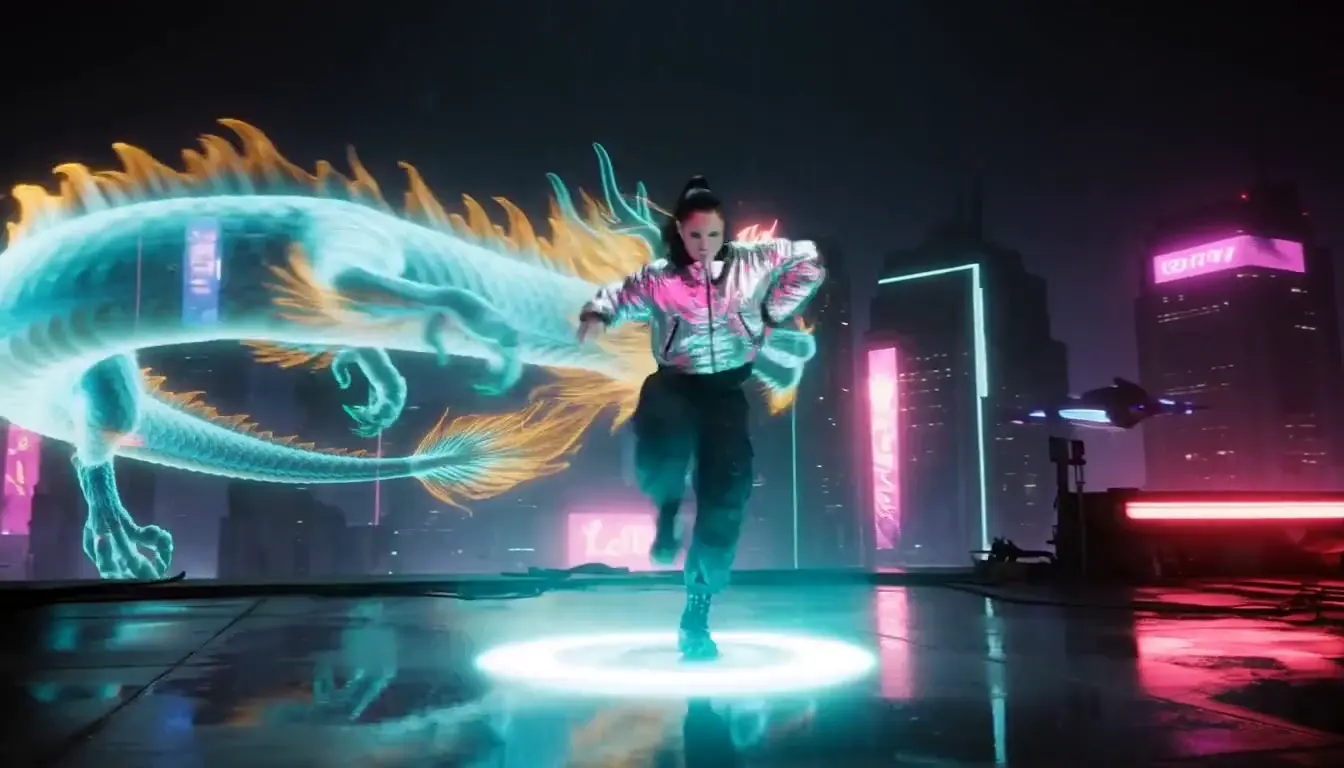
Cyber rooftop dance with a holographic dragon

An 8-second text-to-video run combines full-body hip-hop movement, cyan floor ripples and a dragon above the neon skyline in one continuous camera orbit.

View the exact prompt

A striking adult woman in a silver bomber jacket, loose black cargo pants and sneakers dances on a rain-slick cyberpunk rooftop. Start with a bold full-body pose, then sharp hip-hop footwork and one clean spin. Each step sends cyan light ripples across the floor. A giant holographic dragon coils behind her above the neon skyline. Smooth low-angle camera orbit, magenta rim light, realistic face, stable anatomy. End on a strong pose. Punchy electronic beat. No text or logos.

Use this prompt
MiniMax H3768P · 1344 × 768 · 8s

An amber perfume product shot

An 8-second text prompt keeps one unbranded bottle centered while the camera arcs, sunlight passes through the glass and the linen backdrop moves in the breeze.

View the exact prompt

A single unbranded amber glass perfume bottle stands on dark wet stone beside two orange slices. In one continuous shot, the camera slowly arcs around the bottle as warm sunlight passes through the glass, casting golden reflections. Fine condensation catches the light; a breeze gently moves the linen backdrop. Premium commercial photography, realistic materials, stable bottle shape. No cuts, people, text or logos. Soft wind and distant birds, no music.

Use this prompt
MiniMax H3768P · 1344 × 768 · 5s

An elemental guardian animated from an image

The verified 5-second image-to-video run adds ice, fire, orbiting stones and a slow push-in while using the supplied guardian image as its visual starting point.

View the exact prompt

The adult elemental guardian slowly raises both hands. The ice and fire arcs curl toward each other without covering her face, floating stones orbit the platform, her cape lifts in the wind and the crystals sparkle. Use a slow cinematic push-in with slight parallax, preserving her face, hands, armor and full-body proportions. Blue and amber light pulses across the temple. Native audio: mountain wind, ice crackle, fire roar and a deep magical resonance.

Use this prompt
MiniMax H3768P · 1344 × 768 · 8s

A second cyber dance composition

This 8-second text-to-video take starts close, pulls back during the spin and reveals the luminous dragon, offering a different framing of the same creative direction.

View the exact prompt

A stylish adult woman in a silver jacket, black cargo pants and sneakers performs powerful hip-hop moves on a neon rooftop at night. Start close, then smoothly pull back as she spins and a gigantic luminous dragon rises behind the skyline. Cyan light ripples across the rain-soaked floor with every step. One continuous shot, bold magenta lighting, realistic face, stable anatomy, cinematic scale. Energetic electronic beat. No text or logos.

Use this prompt

All four files measure 1344 × 768 and include an audio track. They demonstrate individual requests, not a guarantee of quality or completion time.

MiniMax H3 vs H3 Max and Turbo

The three options share familiar controls but use separate endpoints and prices. Choose deliberately; switching models is not just changing a display label.

MiniMax H3 vs H3 Max and Turbo
Choose byH3 MaxH3 Max TurboH3
Starting pointText or imageText or imageText or image
Output options480P / 768P480P / 768P480P / 768P
Clip length5–15 seconds (1-second steps)5–15 seconds (1-second steps)5–15 seconds (1-second steps)
Useful forDirected short clipsExploring multiple draftsStandard H3 creations
SoundGenerated audioGenerated audioGenerated audio

Every real example on these H3 pages was requested at 768P and produced a 1344 × 768 file. The examples verify both text-to-video and image-to-video workflows, but do not guarantee every future result.

Explore H3 Max and Turbo

What can you create with H3?

Previsualization

Describe one camera movement and a simple action to explore composition before planning a larger shoot. Treat the output as a draft, not exact choreography.

Short-form storytelling

Create a single visual beat for a social edit. Decide on the subject and ending first, then add atmosphere and sound.

Animating a designed frame

Begin with an image when the character, product or composition is already designed. Describe one motion path and check how well the generated clip preserves the source.

How to use MiniMax H3

  1. Choose text or image input

    Write a scene from scratch, or switch to image-to-video and upload a starting image you are allowed to use. Describe the motion you want while keeping the source composition in mind.

  2. Set the shot and output

    Describe the subject, action, camera and sound. Choose a duration from 5 to 15 seconds in 1-second increments and a resolution. Text-to-video supports aspect-ratio selection; image-to-video follows the first image.

  3. Review the estimate and the result

    When H3 is enabled, sign in and check the credit estimate before generating. Wait for that request to finish rather than repeatedly submitting it. Review visual details and audio before downloading.

Frequently asked questions

What is MiniMax H3?

MiniMax H3 is a video-generation model available in FreyaVideo through separate text-to-video and image-to-video workflows. This page documents those standard workflows with four real paid outputs.

How is H3 different from H3 Max and Turbo?

H3, H3 Max and H3 Max Turbo use separate endpoints and credit calculations. The examples on this page show standard H3, while the linked Max page contains its own Max and Turbo results.

Which H3 workflows did you test?

We completed three text-to-video requests and one image-to-video request. Every example shown here was requested at 768P; the text clips are 8 seconds and the image-led guardian clip is 5 seconds.

What should I put in a prompt?

Specify a subject, one main action, the setting, a camera movement and relevant sound. For example, describe a dancer on a neon rooftop, a smooth camera orbit, cyan light ripples and an electronic beat. Avoid asking for several unrelated transformations in one short shot.

Does H3 include audio?

H3 can generate an audio track with the video. Describe the sound you need in the prompt and listen to the finished clip. Dialogue accuracy, timing and synchronization can vary, so review them before publishing.

Which example starts from an image?

The elemental guardian example uses the supplied guardian artwork as its starting image. Its card lets you view that source and the exact motion-and-audio prompt used for the 5-second result.

Does this page include Director, editing or LoRA?

No. It does not promise Director sessions, arbitrary video editing, video extension or custom LoRA training. Those are different workflows with different input and billing requirements. Only the controls shown in the selected workflow apply here.

Is H3 free on FreyaVideo?

Paid generation uses credits. The selected model, duration and resolution determine the displayed estimate. Watching the examples does not create a generation request or spend generation credits.

Start with one clear shot

Write the scene, choose the format, then check the result before expanding the idea.

Open the H3 generator

Model documentation: MiniMax H3 AI Video Generator