
For short concept clips, H3 Max is the first speed-focused candidate we would test. For a higher-resolution delivery, consider Veo 3.1 Fast. For a brief that needs explicit shot and reference controls, compare Kling 3.0 Standard. The fastest AI video generator for your project is the one that gets an acceptable clip finished soonest.
Check the model variant first: View H3 Max and Turbo models and examples, or explore standard MiniMax H3 models and examples. This article discusses H3 Max. Standard H3 is a different variant: check its own page for controls rather than applying the settings or speed conclusions here to it.
This shortlist compares specific routes on fal, using official information checked on September 4, 2026. It is not a hands-on benchmark or an overall quality ranking. Our recommendations combine published capabilities with practical workflow judgment; we have not generated the same scene on these models for this article.

AI-generated editorial illustration. It does not show outputs from the compared video models or measured performance.
Three generators to shortlist
The table covers text-to-video and image-to-video, rather than every mode offered by each model family.
| Route on fal | Published output settings | Clip length | Audio | Why shortlist it? |
|---|---|---|---|---|
| H3 Max | Native 480p or 768p | 5–15 seconds | Synchronized audio included | Short concept iterations |
| Kling 3.0 Standard | 720p Standard tier | 3–15 seconds | Native audio can be switched on or off | Directed shots and reference elements |
| Veo 3.1 Fast | 720p, 1080p or 4K output | 4, 6 or 8 seconds; use 8 for 1080p/4K | fal exposes an audio toggle | A speed-oriented Veo route with higher output settings |
The H3 Max overview documents its native resolutions, duration and the 720p Kling Standard comparison tier. The Kling Standard schema and Veo Fast schema provide their route controls.
Output size is not always native rendering resolution. Google describes its improved 1080p and 4K Veo outputs as using upscaling. Do not read that row as a claim of native 4K generation. Google's Veo documentation also ties the higher resolutions to eight-second clips. The comparison is useful for choosing a deliverable, not for asserting identical workloads.
Which one should you try first?
H3 Max: start here for a short visual idea
fal reports generating a five-second H3 Max video in under three seconds in its launch announcement. That makes it a reasonable first candidate when you want to explore a product angle, a transition or a social opening without requiring a high-resolution master immediately.
Start with one object and one motion. Review whether the idea works before increasing the duration or adding several events. For a product photo, H3 Max's image route accepts a starting image and an optional ending image; framing follows the starting image. Prepare the crop before testing rather than fixing composition after each attempt.
Use the H3 Max tutorial for a starting preset. This recommendation concerns the Max routes, not H3 Max Turbo or standard MiniMax H3.
Veo 3.1 Fast: consider the delivery format first
fal presents Veo 3.1 Fast as a faster alternative within the Veo 3.1 family. That is a useful reason to shortlist it, but it is not evidence that it beats H3 Max or Kling on the same request.
Choose it when your planned deliverable benefits from its output options and you want to explore the Veo family through its Fast route. Begin the creative test at 720p; move to the required delivery setting after the scene is worth keeping. Google explicitly notes that higher resolution increases latency in its video generation guide.
Avoid mixing a quick, low-resolution draft from one generator with a finished high-resolution request from another when judging speed. They answer different production questions.
Kling 3.0 Standard: choose controls that could reduce revisions
Kling is on this list because render speed is not the only way to finish sooner. Its Standard image route exposes multi-shot prompts, start/end frames and character or object reference elements. These are explicit controls in the endpoint schema, not proof that every result will follow them perfectly.
For a brief with a planned sequence, try expressing that structure directly rather than repeatedly asking a simple prompt to discover it. Write the opening, action and closing shot before generating, so you can identify which part needs revision. We have not established a comparable end-to-end latency for this Standard route, so it has no numerical speed rank here.
Keep this scope narrow: Standard is not Pro, and fal billing is not a Kling website subscription. See H3 Max vs Kling for the separate cost comparison.
What the speed numbers actually measure
| Model or service | Available official speed evidence | What it does not establish |
|---|---|---|
| H3 Max on fal | Under-three-second generation claim for a five-second clip; API reports backend inference | Guaranteed submission-to-download time |
| Veo 3.1 Fast on fal | Positioned as the faster Veo 3.1 variant | A verified lead over either other candidate |
| Kling 3.0 Standard on fal | No directly comparable latency established from the sources used here | A conclusion that Kling is necessarily slower |
H3 Max's API reference defines timings.inference as GPU denoising. It also lists a prompt-rewriting stage: roughly one second for balanced, potentially around 30 seconds for quality. Neither setting removes upload, queue and delivery work.
Google's own Gemini API guide lists a broad request-latency range of 11 seconds to six minutes during peak hours. That describes a different service context; it is not a fal Veo Fast benchmark or a completion guarantee. Google's latency limitations.
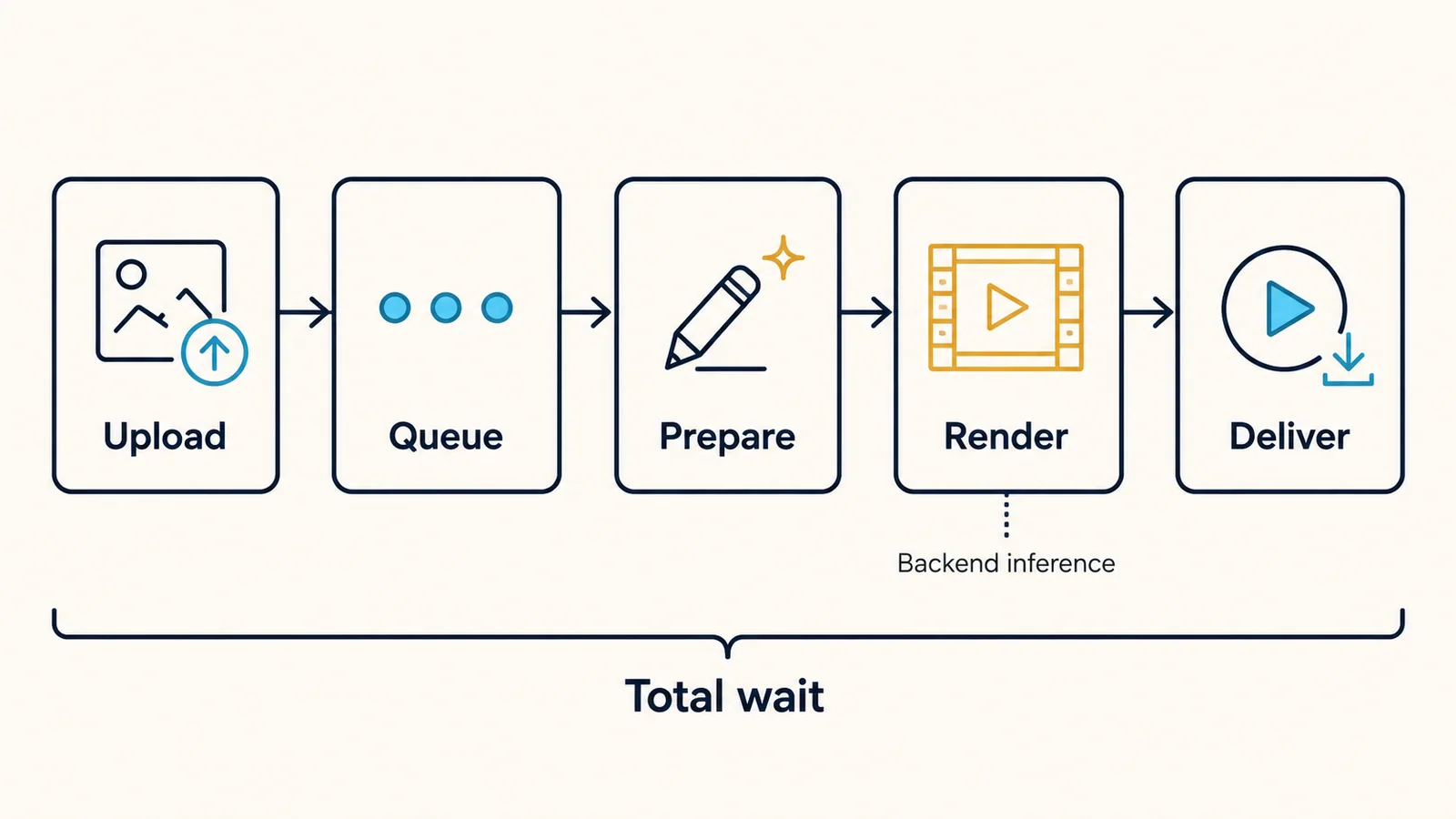
AI-generated explanatory diagram, not a measured timeline. Stage order can vary, and visual widths do not represent elapsed time.
Keep two clocks: submission to playable preview for interactive work, and brief to accepted clip for a production deadline. The second includes rejecting a result, revising the prompt and exporting the final file. A fast preview that needs five revisions can lose to a slower preview you can use immediately.
A small comparison you can actually run
Use an eight-second scene for a shared duration across all three candidates. Keep the aspect ratio, audio requirement and input photograph consistent. H3 Max's 768p and the other routes' 720p are nearby tiers, not identical pixel counts; record the difference.
Before paying for requests, write down what would make a result acceptable. For a product shot, that might be an unchanged silhouette, smooth motion and enough empty space for a caption. Set an equal attempt allowance that fits your budget; three attempts each can help an initial choice, but cannot establish a universal winner.
Try this original brief, which is proposed rather than tested:
A plain blue ceramic mug stands on a wooden table beside a folded napkin. In one continuous eight-second shot, the camera slowly moves closer. The mug stays still, its handle and shape unchanged. Soft daylight, simple background, quiet room ambience, no people, no text and no cuts.
| Record for every attempt | Why it matters |
|---|---|
| Exact route, resolution, duration and audio | Prevents a hidden settings advantage |
| Submission and first playable preview | Captures your actual wait |
| Reported inference, if available | Keeps backend time separate |
| Accepted, rejected, failed or unfinished | Prevents cherry-picking |
| Cost and minutes spent correcting | Connects speed to delivery |
Alternate candidates instead of running all of one model first. Compare the median completed wait, the slowest completed wait and the number of acceptable clips. List unfinished requests separately. If a job is still queued, inspect its status before creating duplicates; fal documents the queue lifecycle.
Make the decision around your deadline
For an exploratory meeting, begin with the short-concept candidate and keep the brief simple. For a committed delivery, choose the route whose format and controls fit the shot, then reserve time for review. Do not spend the whole deadline chasing a theoretically faster model after you already have a usable take.
Review H3 Max models and examples, Veo 3.1 models and controls, and Kling 3.0 models and controls on FreyaVideo to check which variants, resolutions, and controls fit your brief. Then open the image-to-video creator, select an available model, review the credit estimate, and use the worksheet above to record the full wait. H3 Max and Turbo generate on FreyaVideo with the controls and credit estimate shown in the generator. Provider specifications do not imply that FreyaVideo offers every route or guarantees the same speed.
Frequently asked questions
Which AI video generator should I try first for speed?
For a short concept where 768p is sufficient, H3 Max is our first candidate to test. Choose Veo 3.1 Fast when its higher output settings fit the deliverable, or Kling 3.0 Standard when shot and reference controls matter more. These are recommendations based on documented features, not a measured speed ranking.
Does a three-second render mean the video is ready in three seconds?
No. Rendering is only part of the wait. Measure from submission until the result plays, then include review and revisions when estimating the time needed to finish your actual project.
How can I compare generators fairly without spending too much?
Use one brief, the same source image, matched duration and audio requirements, and a fixed attempt budget. Record every attempt, including failures. Compare the median wait, usable results and total spend instead of selecting the fastest successful example.
Can I generate H3 Max videos in FreyaVideo?
FreyaVideo has an H3 Max model page with controls and verified examples. Both H3 Max and Turbo generate on FreyaVideo; check the selected variant and credit estimate before submitting.